Overview
Our platform helps businesses manage customer conversations across multiple messaging channels using AI and live agents.
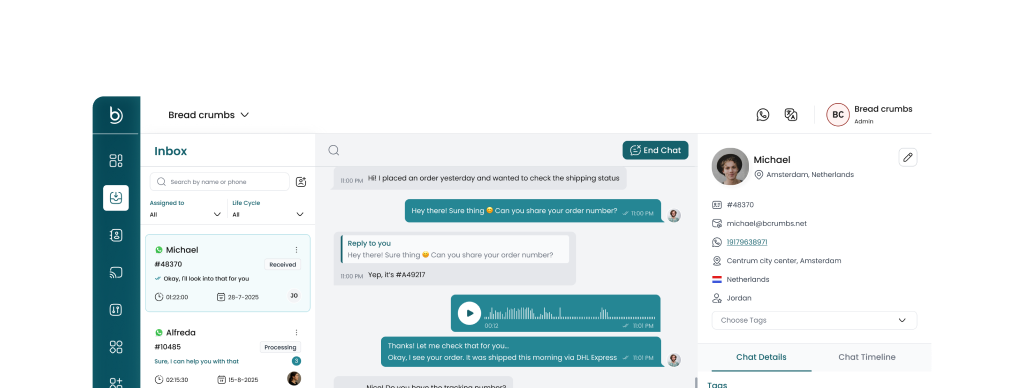
Instead of handling messages separately in tools like WhatsApp, Telegram, or Instagram, all conversations are centralized into a single inbox where teams and AI assistants can collaborate.
The platform is designed to help businesses:
- Respond to customers faster
- Automate common questions with AI
- Allow human agents to step in when needed
- Integrate messaging into their own applications
How It Works
The system connects messaging channels, processes incoming messages, and routes them to AI assistants or human agents.
-
Channels receive messages Customers send messages through channels like WhatsApp, Telegram, or Instagram.
-
Messages are unified into one inbox Incoming messages are converted into a standardized conversation format, and unified into one inbox.
-
AI or automation processes the message AI assistants can answer questions, retrieve information from knowledge bases, or handover to human agents.
-
Human agents can take over If AI cannot resolve the request, live agents can respond directly from the inbox.
-
Responses are sent back to the channel Replies are automatically delivered back to the customer through the same messaging platform.
Core Components
The platform is built around several key components:
- Inbox: The central location for all customer conversations. Open it at https://app.bcrumbs.net/inbox (opens in a new tab).
- AI Assistants: AI agents that can answer questions, retrieve information from knowledge bases, or handover to human agents.
- Human Agents: Live agents that can take over conversations from AI assistants.
- Channels: The integrations that connect Bread Crumbs with external messaging providers.
- APIs and SDKs: The APIs and SDKs that allow you to integrate Bread Crumbs with your own systems.
Typical Use Cases
Businesses commonly use the platform to:
- Provide customer support across messaging apps
- Automate frequently asked questions
- Manage sales inquiries from multiple channels
- Embed messaging inboxes inside their own SaaS platforms
- Build AI-powered customer support workflows
Next Steps
To start using the platform, continue with the Quick Start guide where you'll learn how to:
- Connect your first messaging channel
- Send and receive messages
- Configure AI assistants
- Invite team members to manage conversations